BEIGELOCK MALFUNCTION
TROUBLESHOOTING
Power Recovery
- Main power runs out of battery
- Symptom:
- Pressing the Power button does not turn on the Power LED, and no sound is heard from the buzzer.
- Solution:
- Remove the Battery Cover.
- Connect a charger to the Main Battery using a Type-C cable.
- Symptom:
- Real Time Clock runs out of battery (Timeless mode)
- Symptom:
- Power LED flashes slowly when the Power button is pressed.
- Solution:
- Bypass the clock (Timeless Mode)
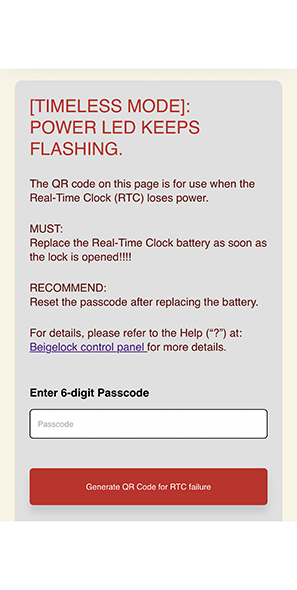
- Visit the Timeless Mode to obtain a special QR code to bypass the real time clock module.
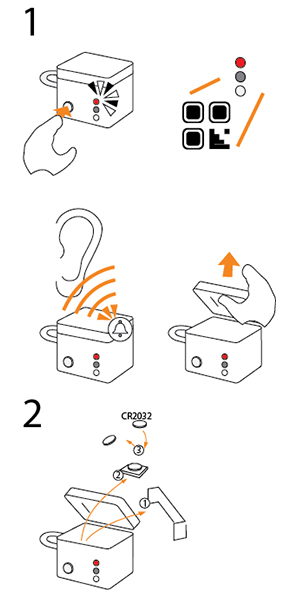
- Press and hold the Power button until the Power LED lights up.
- Hold the QR code in front of the reader while the Power LED is on.
- The lock will open, the Power LED will turn off, and you will hear a confirmation tone.
- Replace the RTC battery
- Remove the Real-Time Clock (RTC) cover.
- Take the RTC module out.
- Replace the RTC Battery.
- Reset the system
- Use your phone’s browser to access the BeigeLock panel.
- Tap the “QR Code for Reset” button.
- Input the new passcode.
- Enter the current date and time
- Tap “Generate QR Code for Reset” (Make sure your browser allows pop-ups so the QR code can be displayed.)
- Keep the cover open and press the Power button until the LED lights up.
- While the Power LED is steady, scan the QR code with the reader.
- Successful reset:- The LED will flash 5 times, and the new passcode will take effect.
- Unsuccessful reset:- THe LED will turn off. Please check the QR code and try again.
- Bypass the clock (Timeless Mode)
- Symptom:
CAUTION:
If the program detects a Real Time Clock failure, it will automatically switch to Timeless mode.
If no Real Time Clock failure is detected, the QR code for Timeless mode will not work.