BEIGELOCK INSTALLATION
SETUP/ RESET
Password & Time settings
- Open the lock
- Open the BeigeLock panel
- Use your phone’s browser to access the BeigeLock panel.
- Select reset function
- Tap the “QR Code for Reset” button.
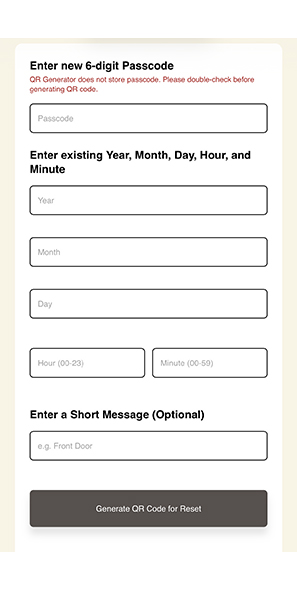
- Enter new passcode
- Input the new passcode.
- Set date and time
- Enter the current date and time.
- Generate reset QR code
- Tap “Generate QR Code for Reset” (Make sure your browser allows pop-ups so the QR code can be displayed.)
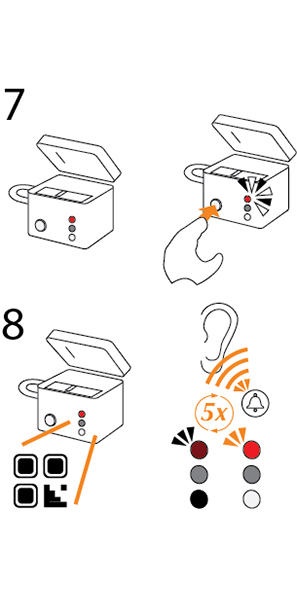
- Activate reset mode
- Keep the cover open and press the Power button until the LED lights up.
- Scan the QR code
- While the Power LED is steady, scan the QR code with the reader.
- Successful reset:- The LED will flash 5 times, and the new passcode will take effect.
- Unsuccessful reset:- THe LED will turn off. Please check the QR code and try again.
- While the Power LED is steady, scan the QR code with the reader.
WARNING:
Keep the cover open and test the new passcode before closing the BeigeLock for use.